Deployment

Oct 13, 2020

Fast Deploy NebulaGraph Cluster with Docker Swarm

Henson Wu

This post describes in detail how to deploy a NebulaGraph cluster with Docker Swarm.

Deploy a NebulaGraph Cluster

2.1 Environment Preparation

Prepare hosts as below.

ip

Memory (GB)

CPU (# of Cores)

192.168.1.166

16

4

192.168.1.167

16

4

192.168.1.168

16

4

Please make sure that Docker has been installed on all the machines.

2.2 Initialize the Swarm Cluster

Execute the commands below on the host 192.168.1.166:


2.3 Add a Worker Node

Add a Swarm worker node per the notification message of the init commands. Execute the following commands on 192.168.1.167 and 192.168.1.168 respectively.


2.4 Authenticate the Cluster


2.5 Configure Docker Stack

Configure Docker Stack as below:

version: '3.6'
services:
  metad0:
    image: vesoft/nebula-metad:nightly
    env_file:
      - ./nebula.env
    command:
      - --meta_server_addrs=192.168.1.166:45500,192.168.1.167:45500,192.168.1.168:45500
      - --local_ip=192.168.1.166
      - --ws_ip=192.168.1.166
      - --port=45500
      - --data_path=/data/meta
      - --log_dir=/logs
      - --v=0
      - --minloglevel=2
    deploy:
      replicas: 1
      restart_policy:
        condition: on-failure
      placement:
        constraints:
          - node.hostname == KF2-DATA-166
    healthcheck:
      test: ["CMD", "curl", "-f", "http://192.168.1.166:11000/status"]
      interval: 30s
      timeout: 10s
      retries: 3
      start_period: 20s
    ports:
      - target: 11000
        published: 11000
        protocol: tcp
        mode: host
      - target: 11002
        published: 11002
        protocol: tcp
        mode: host
      - target: 45500
        published: 45500
        protocol: tcp
        mode: host
    volumes:
      - data-metad0:/data/meta
      - logs-metad0:/logs
    networks:
      - nebula-net

  metad1:
    image: vesoft/nebula-metad:nightly
    env_file:
      - ./nebula.env
    command:
      - --meta_server_addrs=192.168.1.166:45500,192.168.1.167:45500,192.168.1.168:45500
      - --local_ip=192.168.1.167
      - --ws_ip=192.168.1.167
      - --port=45500
      - --data_path=/data/meta
      - --log_dir=/logs
      - --v=0
      - --minloglevel=2
    deploy:
      replicas: 1
      restart_policy:
        condition: on-failure
      placement:
        constraints:
          - node.hostname == KF2-DATA-167
    healthcheck:
      test: ["CMD", "curl", "-f", "http://192.168.1.167:11000/status"]
      interval: 30s
      timeout: 10s
      retries: 3
      start_period: 20s
    ports:
      - target: 11000
        published: 11000
        protocol: tcp
        mode: host
      - target: 11002
        published: 11002
        protocol: tcp
        mode: host
      - target: 45500
        published: 45500
        protocol: tcp
        mode: host
    volumes:
      - data-metad1:/data/meta
      - logs-metad1:/logs
    networks:
      - nebula-net

  metad2:
    image: vesoft/nebula-metad:nightly
    env_file:
      - ./nebula.env
    command:
      - --meta_server_addrs=192.168.1.166:45500,192.168.1.167:45500,192.168.1.168:45500
      - --local_ip=192.168.1.168
      - --ws_ip=192.168.1.168
      - --port=45500
      - --data_path=/data/meta
      - --log_dir=/logs
      - --v=0
      - --minloglevel=2
    deploy:
      replicas: 1
      restart_policy:
        condition: on-failure
      placement:
        constraints:
          - node.hostname == KF2-DATA-168
    healthcheck:
      test: ["CMD", "curl", "-f", "http://192.168.1.168:11000/status"]
      interval: 30s
      timeout: 10s
      retries: 3
      start_period: 20s
    ports:
      - target: 11000
        published: 11000
        protocol: tcp
        mode: host
      - target: 11002
        published: 11002
        protocol: tcp
        mode: host
      - target: 45500
        published: 45500
        protocol: tcp
        mode: host
    volumes:
      - data-metad2:/data/meta
      - logs-metad2:/logs
    networks:
      - nebula-net

  storaged0:
    image: vesoft/nebula-storaged:nightly
    env_file:
      - ./nebula.env
    command:
      - --meta_server_addrs=192.168.1.166:45500,192.168.1.167:45500,192.168.1.168:45500
      - --local_ip=192.168.1.166
      - --ws_ip=192.168.1.166
      - --port=44500
      - --data_path=/data/storage
      - --log_dir=/logs
      - --v=0
      - --minloglevel=2
    deploy:
      replicas: 1
      restart_policy:
        condition: on-failure
      placement:
        constraints:
          - node.hostname == KF2-DATA-166
    depends_on:
      - metad0
      - metad1
      - metad2
    healthcheck:
      test: ["CMD", "curl", "-f", "http://192.168.1.166:12000/status"]
      interval: 30s
      timeout: 10s
      retries: 3
      start_period: 20s
    ports:
      - target: 12000
        published: 12000
        protocol: tcp
        mode: host
      - target: 12002
        published: 12002
        protocol: tcp
        mode: host
    volumes:
      - data-storaged0:/data/storage
      - logs-storaged0:/logs
    networks:
      - nebula-net
  storaged1:
    image: vesoft/nebula-storaged:nightly
    env_file:
      - ./nebula.env
    command:
      - --meta_server_addrs=192.168.1.166:45500,192.168.1.167:45500,192.168.1.168:45500
      - --local_ip=192.168.1.167
      - --ws_ip=192.168.1.167
      - --port=44500
      - --data_path=/data/storage
      - --log_dir=/logs
      - --v=0
      - --minloglevel=2
    deploy:
      replicas: 1
      restart_policy:
        condition: on-failure
      placement:
        constraints:
          - node.hostname == KF2-DATA-167
    depends_on:
      - metad0
      - metad1
      - metad2
    healthcheck:
      test: ["CMD", "curl", "-f", "http://192.168.1.167:12000/status"]
      interval: 30s
      timeout: 10s
      retries: 3
      start_period: 20s
    ports:
      - target: 12000
        published: 12000
        protocol: tcp
        mode: host
      - target: 12002
        published: 12004
        protocol: tcp
        mode: host
    volumes:
      - data-storaged1:/data/storage
      - logs-storaged1:/logs
    networks:
      - nebula-net

  storaged2:
    image: vesoft/nebula-storaged:nightly
    env_file:
      - ./nebula.env
    command:
      - --meta_server_addrs=192.168.1.166:45500,192.168.1.167:45500,192.168.1.168:45500
      - --local_ip=192.168.1.168
      - --ws_ip=192.168.1.168
      - --port=44500
      - --data_path=/data/storage
      - --log_dir=/logs
      - --v=0
      - --minloglevel=2
    deploy:
      replicas: 1
      restart_policy:
        condition: on-failure
      placement:
        constraints:
          - node.hostname == KF2-DATA-168
    depends_on:
      - metad0
      - metad1
      - metad2
    healthcheck:
      test: ["CMD", "curl", "-f", "http://192.168.1.168:12000/status"]
      interval: 30s
      timeout: 10s
      retries: 3
      start_period: 20s
    ports:
      - target: 12000
        published: 12000
        protocol: tcp
        mode: host
      - target: 12002
        published: 12006
        protocol: tcp
        mode: host
    volumes:
      - data-storaged2:/data/storage
      - logs-storaged2:/logs
    networks:
      - nebula-net
  graphd1:
    image: vesoft/nebula-graphd:nightly
    env_file:
      - ./nebula.env
    command:
      - --meta_server_addrs=192.168.1.166:45500,192.168.1.167:45500,192.168.1.168:45500
      - --port=3699
      - --ws_ip=192.168.1.166
      - --log_dir=/logs
      - --v=0
      - --minloglevel=2
    deploy:
      replicas: 1
      restart_policy:
        condition: on-failure
      placement:
        constraints:
          - node.hostname == KF2-DATA-166
    depends_on:
      - metad0
      - metad1
      - metad2
    healthcheck:
      test: ["CMD", "curl", "-f", "http://192.168.1.166:13000/status"]
      interval: 30s
      timeout: 10s
      retries: 3
      start_period: 20s
    ports:
      - target: 3699
        published: 3699
        protocol: tcp
        mode: host
      - target: 13000
        published: 13000
        protocol: tcp
#        mode: host
      - target: 13002
        published: 13002
        protocol: tcp
        mode: host
    volumes:
      - logs-graphd:/logs
    networks:
      - nebula-net

  graphd2:
    image: vesoft/nebula-graphd:nightly
    env_file:
      - ./nebula.env
    command:
      - --meta_server_addrs=192.168.1.166:45500,192.168.1.167:45500,192.168.1.168:45500
      - --port=3699
      - --ws_ip=192.168.1.167
      - --log_dir=/logs
      - --v=2
      - --minloglevel=2
    deploy:
      replicas: 1
      restart_policy:
        condition: on-failure
      placement:
        constraints:
          - node.hostname == KF2-DATA-167
    depends_on:
      - metad0
      - metad1
      - metad2
    healthcheck:
      test: ["CMD", "curl", "-f", "http://192.168.1.167:13001/status"]
      interval: 30s
      timeout: 10s
      retries: 3
      start_period: 20s
    ports:
      - target: 3699
        published: 3640
        protocol: tcp
        mode: host
      - target: 13000
        published: 13001
        protocol: tcp
        mode: host
      - target: 13002
        published: 13003
        protocol: tcp
#        mode: host
    volumes:
      - logs-graphd2:/logs
    networks:
      - nebula-net
  graphd3:
    image: vesoft/nebula-graphd:nightly
    env_file:
      - ./nebula.env
    command:
      - --meta_server_addrs=192.168.1.166:45500,192.168.1.167:45500,192.168.1.168:45500
      - --port=3699
      - --ws_ip=192.168.1.168
      - --log_dir=/logs
      - --v=0
      - --minloglevel=2
    deploy:
      replicas: 1
      restart_policy:
        condition: on-failure
      placement:
        constraints:
          - node.hostname == KF2-DATA-168
    depends_on:
      - metad0
      - metad1
      - metad2
    healthcheck:
      test: ["CMD", "curl", "-f", "http://192.168.1.168:13002/status"]

Edit the nebula.env file by adding the items below:


2.6 Start the NebulaGraph Cluster

Cluster Configuration for Load Balancing and High Availability

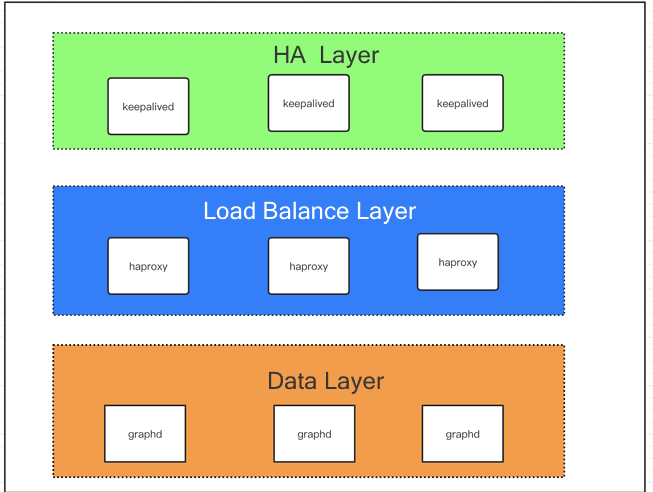
The NebulaGraph clients (1.X) don't provide load balancing capability currently. They randomly select any graphd to connect the database. Therefore, you need to configure load balancing and high availability on your own if you want to use NebulaGraph in production.


Cluster Configuration for Load Balancing and High Availability

Seen from the figure above, the entire deployment can be divided into three layers, i.e. data layer, load balance layer, and high availability layer.

The load balance layer is responsible for distributing the requests from the client to the data layer for load balancing purpose.

The HA layer is realized by HAProxy and it ensures that the load balancing service works properly so that the entire cluster works properly.

3.1 Load Balancing Configuration

HAProxy uses Docker compose for configuration. Edit the three files below respectively:

  1. Dockerfile


  1. docker-compose.yml


  1. haproxy.cfg

global
    daemon
    maxconn 30000
    log 127.0.0.1 local0 info
    log 127.0.0.1 local1 warning

defaults
    log-format %hr\ %ST\ %B\ %Ts
    log  global
    mode http
    option http-keep-alive
    timeout connect 5000ms
    timeout client 10000ms
    timeout server 50000ms
    timeout http-request 20000ms

# Customize your own frontends && backends && listen conf
# CUSTOM

listen graphd-cluster
    bind *:3640
    mode tcp
    maxconn 300
    balance roundrobin
    server server1 192.168.1.166:3699 maxconn 300 check
    server server2 192.168.1.167:3699 maxconn 300 check
    server server3 192.168.1.168:3699 maxconn 300 check

listen stats
    bind *:1080
    stats refresh 30s
    stats uri /stats

3.2 Start HAProxy

3.3 HA Configuration

Follow the configuration steps on 192.168.1.166, 192.168.1.167, and 192.168.1.168.

  1. Install Keepalived

  1. Modify Keepalived's configuration file, i.e. /etc/keepalived/keepalived.conf. Note that the priority item should be set to different values for the three hosts so that there is a priority among them.**

Note: Please be noted that vip (virtual IP) is required to configure Keepalive. In the configurations below, 192.168.1.99 is the virtual IP.

a. Configuration on 192.168.1.166

global_defs {
    router_id lb01 #An identifier;
}
vrrp_script chk_haproxy {
    script "killall -0 haproxy"    interval 2
}
vrrp_instance VI_1 {
    state MASTER
    interface ens160
    virtual_router_id 52
    priority 999
    # Set the interval (in seconds) for sync check between MASTER and BACKUP load balancers.
    advert_int 1
    # Configure the authentication type and password
    authentication {
    # Configure the authentication type, mainly PASS and AH
        auth_type PASS
    # Set the authentication password.The MASTER and BACKUP load balancers must use the same password within the same vrrp_instance to communicate properly.
        auth_pass amber1
    }
    virtual_ipaddress {
        # The virtual IP is 192.168.1.99/24; Bounded interface is ens160; Alias for both MASTER and BACKUP load balancers is ens160:1
        192.168.1.99/24 dev ens160 label ens160:1
    }
    track_script {
        chk_haproxy
    }
}

b. Configuration on 192.168.1.167

global_defs {
    router_id lb01 #An identifier;
}
vrrp_script chk_haproxy {
    script "killall -0 haproxy"    interval 2
}
vrrp_instance VI_1 {
    state BACKUP
    interface ens160
    virtual_router_id 52
    priority 888
    # Set the interval (in seconds) for sync check between MASTER and BACKUP load balancers.
    advert_int 1
    # Configure the authentication type and password
    authentication {
    # Configure the authentication type, mainly PASS and AH
        auth_type PASS
    # Set the authentication password.The MASTER and BACKUP load balancers must use the same password within the same vrrp_instance to communicate properly.
        auth_pass amber1
    }
    virtual_ipaddress {
        # The virtual IP is 192.168.1.99/24; Bounded interface is ens160; Alias for both MASTER and BACKUP load balancers is ens160:1
        192.168.1.99/24 dev ens160 label ens160:1
    }
    track_script {
        chk_haproxy
    }
}

c. Configuration on 192.168.1.168

global_defs {
    router_id lb01 #An identifier;
}
vrrp_script chk_haproxy {
    script "killall -0 haproxy"    interval 2
}
vrrp_instance VI_1 {
    state BACKUP
    interface ens160
    virtual_router_id 52
    priority 777
    # Set the interval (in seconds) for sync check between MASTER and BACKUP load balancers.
    advert_int 1
   # Configure the authentication type and password
    authentication {
    # Configure the authentication type, mainly PASS and AH
        auth_type PASS
    # Set the authentication password.The MASTER and BACKUP load balancers must use the same password within the same vrrp_instance to communicate properly.
        auth_pass amber1
    }
    virtual_ipaddress {
        # The virtual IP is 192.168.1.99/24; Bounded interface is ens160; Alias for both MASTER and BACKUP load balancers is ens160:1
        192.168.1.99/24 dev ens160 label ens160:1
    }
    track_script {
        chk_haproxy
    }
}

Relevant commands used in Keepalived:

# Start Keepalived
systemctl start keepalived
# Auto start Keepalived
systemctl enable keeplived
# Re-start Keepalived
systemctl restart keepalived

Deploy the Cluster Offline

How to deploy the NebulaGraph cluster with Docker Swarm offline? The answer is simple. Changing the Docker image to private image repo will do.

If you have any questions regarding deploying NebulaGraph with Docker Swarm, please leave your comments in this thread: https://discuss.nebula-graph.io/t/fast-deploy-nebula-graph-cluster-with-docker-swarm/693

You might also like:

  1. NebulaGraph Architecture — A Bird’s Eye View

  2. An Introduction to NebulaGraph's Storage Engine

  3. An Introduction to NebulaGraph’s Query Engine

Go From Zero to Graph in Minutes

Spin Up Your NebulaGraph Cluster Instantly! 

✅ 14-day free trial

✅ No credit card required

✅ Cancel anytime

Go From Zero to Graph in Minutes

Spin Up Your NebulaGraph Cluster Instantly! 

✅ 14-day free trial ✅ No credit card required ✅ Cancel anytime

Go From Zero to Graph in Minutes

Spin Up Your NebulaGraph Cluster Instantly! 

✅ 14-day free trial
✅ No credit card required
✅ Cancel anytime