An Introduction to Snapshot in NebulaGraph
sky
Architecture
1. Overview
1.1 Terms
Names | Descriptions |
|---|---|
Storage Engine | NebulaGraph's smallest physical storage unit, currently supports RocksDB and HBase, this document is only for RocksDB. |
Partition | NebulaGraph's smallest logical storage unit. A StorageEngine contains multiple partitions. A partition is divided into a leader and multiple followers, and Raft protocol is used to ensure data consistency between the leader and the followers. |
Graph Space | Each graph space is an isolated graph unit that has its own tags and edges. A NebulaGraph cluster contains many graph spaces. |
checkpoint | Checkpoints can be used as a point in time snapshot for the storage engine. Checkpoint can be used for full backup. Checkpoint file is a hard link for the sst file. |
snapshot | The snapshot in this document refers to a snapshot that captures a point-in-time view of NebulaGraphcluster, i.e. a collection of the checkpoints for all the storage engines in the cluster. A cluster can be restored to the state when a certain snapshot is created via the snapshot. |
wal | Write-ahead Log (wal) is used by Raft to ensure the consistency between leaders and followers. |
1.2 Background
In production, NebulaGraph handles massive data and high frequency business requests, therefore, faults caused by human, hardware or processing are inevitable. Some fatal faults even lead to abnormal operation or data failure in the cluster. When such situation occurs, rebuilding cluster and reimporting data becomes rather time-consuming.
As a solution to this problem, NebulaGraph supports creating snapshot for the clusters. You first create a snapshot then use it to to restore the cluster to an available state when catastrophic failures take place.
2. Architecture
2.1 Architecture Overview
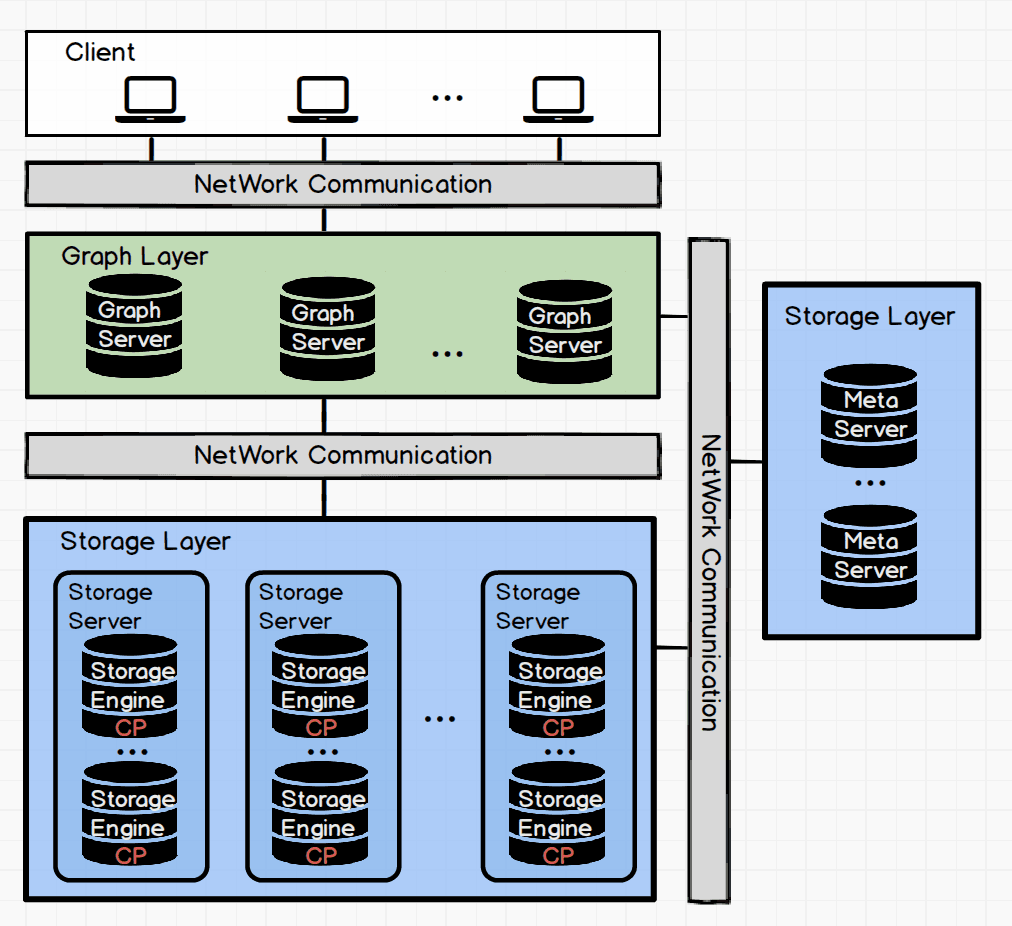
2.2 Storage System Structure
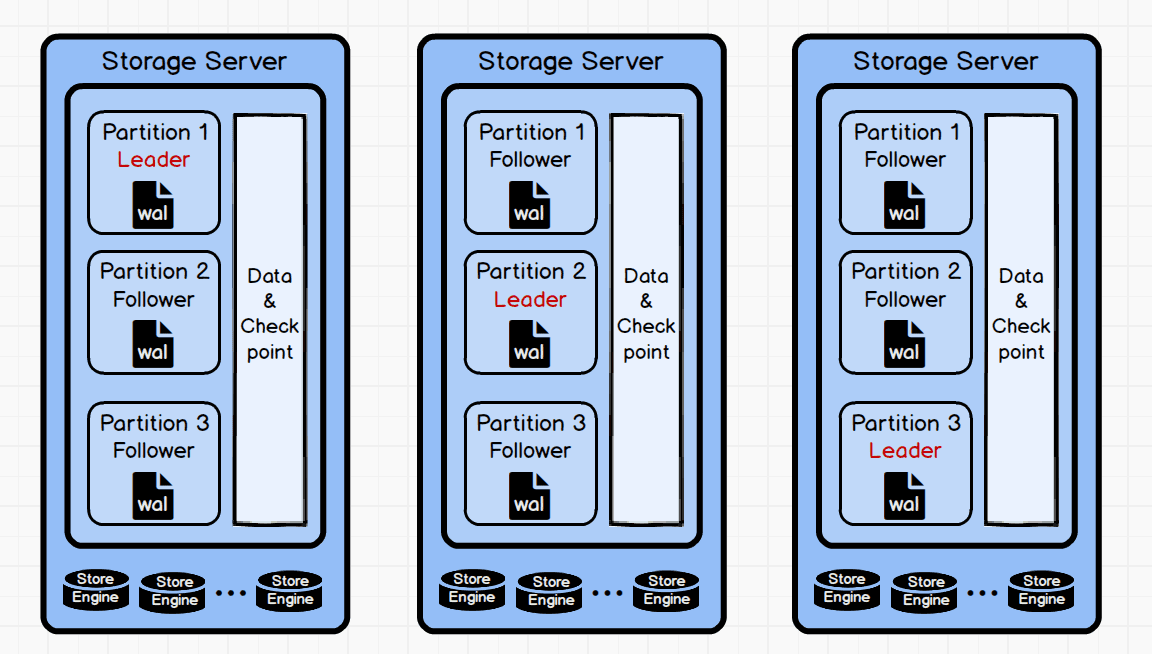
2.3 Storage System File Structure
3. Logic Analysis Processing
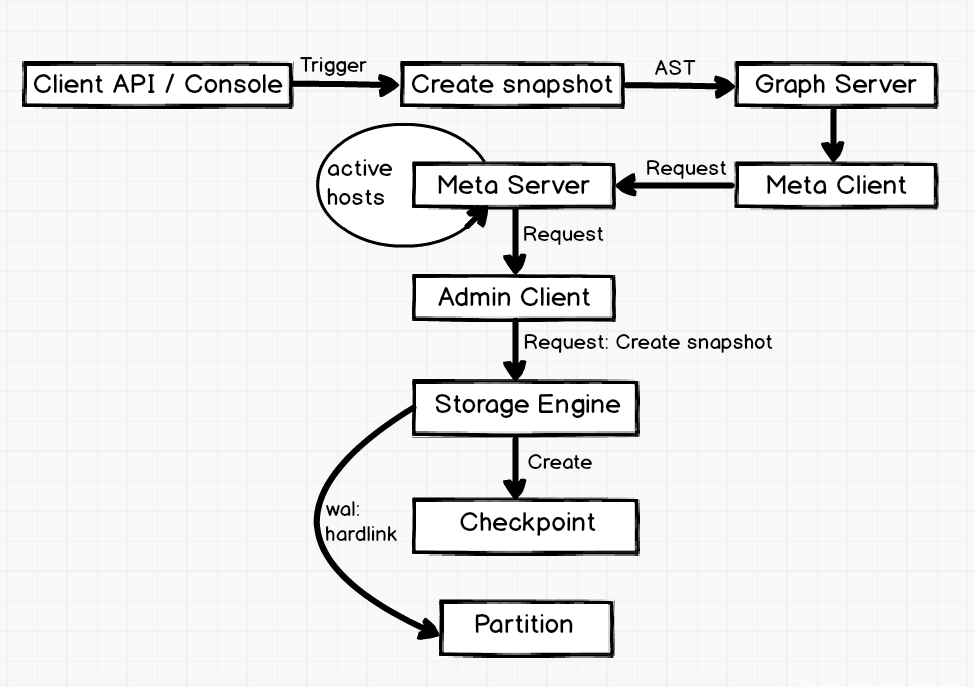
The CREATE SNAPSHOT is triggered with the client api or the console. The graph server parses the AST of the CREATE SNAPSHOTand sends the creation request to the meta server via the meta client. After receiving the request, the meta server first obtains all the active hosts and creates requests required by the adminClient. The creation requests are sent to each storage engine through the adminClient. After receiving the requests, the storage engine traverses all the storage engines of the specified spaces and creates checkpoint, then hard links the wals of all the partitions in storage engine. When creating checkpoint and the wal hard links, the database is read-only because the write blocking requests have been sent to all the leader partitions in advance.
Because the snapshot names are generated automatically with the system timestamp, you do not need to worry about renaming the snapshots. If you created unnecessary snapshots, you can delete them with the DROP SNAPSHOT command.
3.1 Create Snapshot
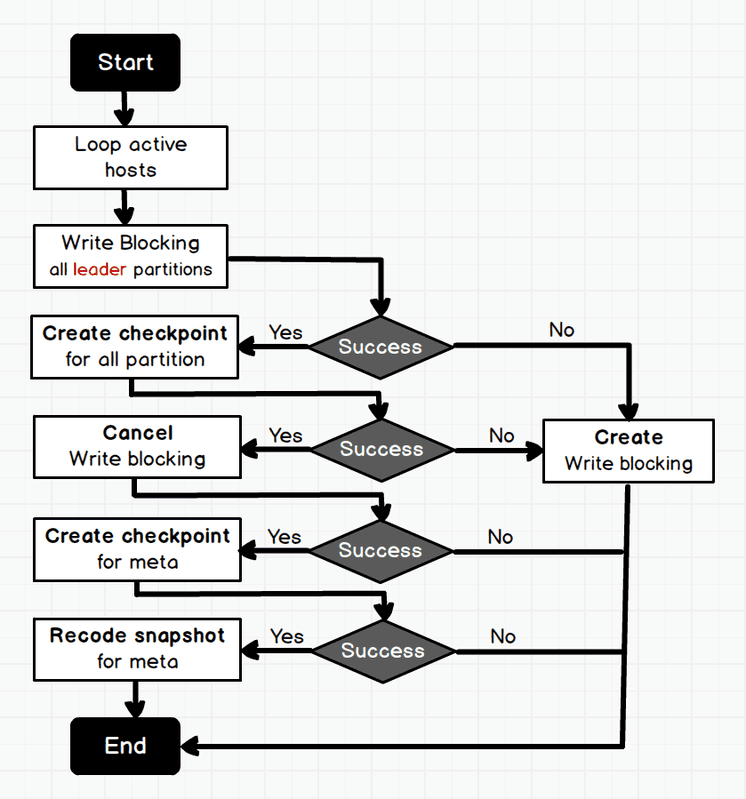
3.2 Create Checkpoint
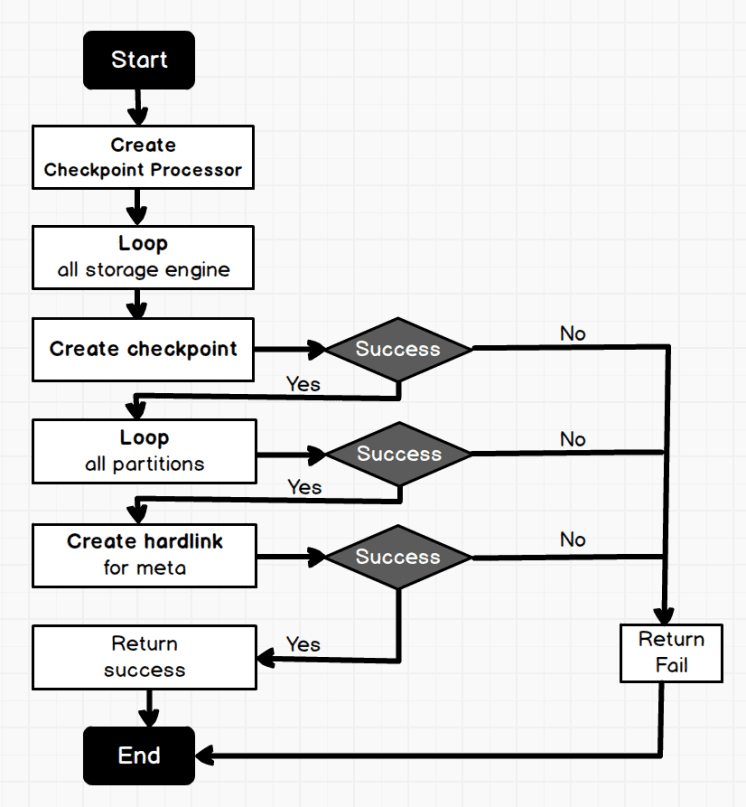
4. Key Code Implementation
4.1 Create Snapshot
4.2 Create Checkpoint
5. User Guide
5.1 CREATE SNAPSHOT
The CREATE SNAPSHOT command creates a snapshot at the current point in time for the whole cluster. The snapshot name is composed of the timestamp of the meta server.
If snapshot creation fails in the current version, you must use the DROP SNAPSHOT to clear the invalid snapshots. The current version does not support creating snapshot for the specified graph spaces, and executing CREATE SNAPSHOT creates a snapshot for all graph spaces in the cluster. For example:
5.2 Show Snapshots
The command SHOW SNAPSHOT looks at the states (VALID or INVALID), names and the IP addresses of all storage servers when the snapshots are created in the cluster. For example:
5.3 Delete Snapshot
The DROP SNAPSHOT command deletes a snapshot with the specified name, the syntax is:
You can get the snapshot names with the command SHOW SNAPSHOTS. DROP SNAPSHOT can delete both valid snapshots and invalid snapshots that failed during creation. For example:
Now the deletes snapshot is not in the show snapshots list.
6. Tips
When the system structure changes, it is better to create a snapshot immediately. For example, when you add host, drop host, create space, drop space or balance.
The current version does not support automatic garbage collection for the failed snapshots in creation. We will develop cluster checker in meta server to check the cluster state via asynchronous threads and automatically collect the garbage files in failure snapshot creation.
The current version does not support customized snapshot directory. The snapshots are created in the
data_path/nebuladirectory by default.The current version does not support snapshot restore. Users need to write a shell script based on their actual productions to restore snapshots. The implementation logic is rather simple, you copy the snapshots of the engine servers to the specified folder, set this folder to
data_path/, then start the cluster.